
AI Job Title Generator — Create Professional Job Titles From Responsibilities or Skills
Generate accurate, ATS‑friendly job titles in seconds with an AI job title generator that analyzes responsibilities, skills, industry, and seniority to produce clear, professional titles for resumes, LinkedIn, and job postings. Paste a job description or list core responsibilities, add key skills, select experience level, and instantly get standardized titles, similar alternatives, and creative options. This job title finder helps recruiters, HR, and candidates improve searchability, clarity, and clicks across job boards and professional networks.
Generate job titles based on responsibilities, skills, and seniority
- Paste responsibilities or a full job description to get accurate, standardized job titles and close variants.
- Add skills and seniority to tailor titles for entry, mid, senior, or executive roles across industries.
- Explore creative or random job title ideas to match employer tone and branding needs.
What is a Job Title Generator?
A job title generator is an AI-powered tool that creates accurate, industry‑standard job titles from responsibilities, skills, seniority, and industry context, helping recruiters and candidates standardize titles for resumes, LinkedIn, and job postings. It functions as a job title finder by analyzing a pasted job description or bullet‑point duties to surface clear, searchable titles and close alternatives.
Unlike manual brainstorming, an AI job title generator quickly evaluates core responsibilities and required skills, maps them to common role families and levels, and returns professional titles aligned with market usage and ATS conventions. This improves clarity, searchability, and click‑through on job boards while reducing guesswork for HR and hiring teams.
Key capabilities
- Generate job titles based on responsibilities, skills, and seniority for any industry.
- Provide standardized titles plus similar alternatives to match recruiter expectations.
- Support creative or random job title ideas for branding and employer tone testing.
- Speed up HR workflows by replacing manual title brainstorming with data‑driven suggestions.
When to use it
- Job seekers refining resume titles or LinkedIn headlines for better recruiter discovery.
- HR teams standardizing titles across postings and internal leveling frameworks.
- Hiring managers turning a draft job description into clear, searchable position titles.
For best results, include a short job description, key responsibilities, and 3–8 skills, then select experience level to tailor titles for entry, mid, senior, or executive roles. This mirrors top generators that focus on simple inputs with fast, practical outputs for real hiring workflows.
Why is a Job Title Important?
Crafting the right job title is crucial for both job seekers and employers. Here's why it matters:
- Professional Identity & Clarity 🎯: A proper job title clearly defines your role and responsibilities, helping you understand expectations and positioning yourself effectively in the job market.
- Enhanced Searchability 🔍: An appropriate job title increases your visibility to recruiters and hiring managers, making it easier for them to find your profile when searching for specific skills.
- Career Advancement 📈: The right title reflects your level of expertise and can open doors to better opportunities, salary negotiations, and career progression.
- Attracts Right Candidates 👥: For employers, clear and specific job titles help attract qualified candidates, reducing time and effort in the hiring process.
- Employee Satisfaction 😊: Accurate job titles set clear expectations for candidates about their role and contributions, leading to better job satisfaction and retention.
How to Use the AI Job Title Generator
Create professional, ATS‑friendly job titles in minutes by pasting responsibilities or a full job description, adding key skills, and selecting seniority; the AI returns standardized titles, similar alternatives, and creative options ready for resumes, LinkedIn, and job postings.
Paste core responsibilities or a full JD. Clear duties and scope help the AI map to accurate role families and seniority levels.
Include 3–8 key skills and choose the industry or function to refine relevance and match industry‑standard naming.
Pick Entry, Mid, Senior, or Executive so the generator aligns titles with scope and leadership expectations.
Click “Generate Job Titles” to see standardized titles, close variants, and creative options you can copy in one click.
Select the best title and tweak wording to fit company tone or personal branding. Save or copy directly.
- Prefer structured input? Use Responsibilities mode to generate titles based on duties.
- Need skill‑aligned results? Try Skills mode to emphasize competencies and tools.
- Have a full JD? Use Job Title Finder to get standardized titles and similar alternatives.
Why is a Job Title Important?
The right job title improves clarity, searchability, and clicks across resumes, LinkedIn, and job boards. A standardized, ATS‑friendly title sets expectations, maps to seniority, and helps recruiters and candidates find the best match faster.
- Professional clarity: A clear, industry‑standard title communicates responsibilities, scope, and seniority at a glance for hiring teams and readers.
- Better searchability: Standardized titles match how recruiters search, improving visibility in ATS, LinkedIn, and job boards for relevant queries.
- Aligned expectations: Titles calibrated to Entry, Mid, Senior, or Executive set the right level for compensation, leadership, and decision‑making.
- Higher CTR on postings: Precise, recognizable titles attract qualified candidates and reduce noise, improving application quality and conversion.
- Employer branding: Consistent titles across teams signal maturity and organization, while creative variants can support culture and tone where appropriate.
Use the AI Job Title Generator to turn responsibilities and skills into standardized titles, similar alternatives, and creative options—ready for resumes, LinkedIn, and job postings.
Example of Job Title Generation
See how the AI job title generator turns responsibilities and skills into standardized, ATS‑friendly job titles with close variants for different industries and seniority levels.
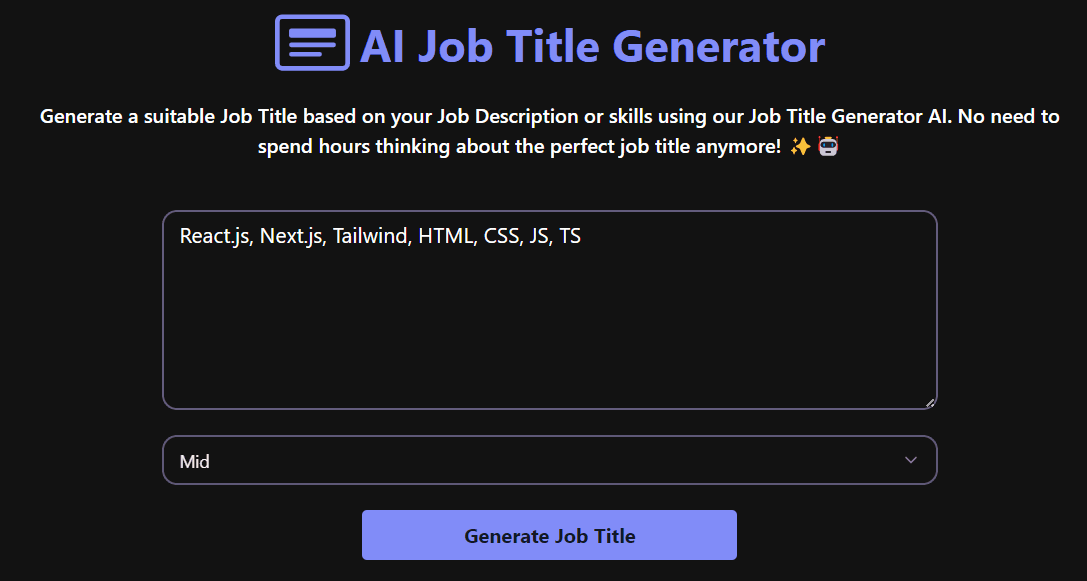
Try different inputs: use Responsibilities mode for duties-first results, Skills mode for competency-aligned titles, and Job Title Finder when pasting a full job description.
Generate Job Titles From Responsibilities
Paste a short list of duties or a role summary, and the AI maps responsibilities to the right role family and seniority to produce standardized, ATS‑friendly job titles with close variants. This mode is ideal when a job description draft exists but the exact position title is unclear.
- Tip: Use 4–8 responsibilities with action verbs and scope.
- Include ownership, team size, and impact where relevant.
- Output: 5–10 titles ranked by clarity and market usage.
Tips for Better Results
Get cleaner, more relevant titles by supplying focused inputs and clear seniority signals. Use responsibilities, skills, and industry context to guide the generator toward standardized, ATS‑friendly job titles.
- List 4–8 responsibilities with action verbs and scope (own, lead, coordinate, design).
- Include seniority cues (years, leadership, budget, team size, autonomy) for level accuracy.
- Add 3–8 skills/tools/certs to steer toward the correct role family and specialization.
- Choose industry/function filters to align with common naming conventions.
- Prefer standardized wording (“Manager,” “Specialist,” “Engineer”) over internal jargon.
ATS and SEO Best Practices for Job Titles
Clear, standardized titles perform better in applicant tracking systems, job boards, and search. Keep titles concise, avoid special characters, and match common market terminology for stronger discoverability.
- Keep it short: 2–4 words is ideal (e.g., “Digital Marketing Manager”).
- Avoid symbols and fluff; skip benefits, locations, and exclamations in the title.
- Use recognizable role and level terms (Associate, Senior, Lead, Director, VP).
- Pair creative/internal titles with a standardized public title for clarity.
- Mirror how candidates search: include common acronyms with full form where relevant (e.g., “Certified Public Accountant (CPA)”).
Use the AI Job Title Generator to convert responsibilities and skills into standardized, searchable titles—then refine with level and industry filters for maximum visibility.
Generate Job Titles From Skills
Provide 3–8 key skills, tools, or certifications to get titles aligned to competencies and typical industry naming conventions. Great for resumes, internal leveling, or when responsibilities are fluid but core skills are known.
- Tip: Mix core skills (e.g., Python) with context (e.g., ETL, BI).
- Add function/industry filters to refine relevance.
- Output: Standard titles plus similar alternatives by level.
Job Title Finder (Paste a Full JD)
Paste the complete job description to get a canonical, standardized title with close alternatives used across job boards and professional networks. Perfect for recruiters and hiring managers seeking consistency across postings.
- Tip: Ensure the JD includes scope, outcomes, and seniority signals.
- Refine with seniority selector (Entry, Mid, Senior, Executive).
- Output: 1–2 canonical titles plus 5–8 close variants.
Not sure which mode to use? Start with Responsibilities mode for duties‑first clarity, then switch to Skills mode to compare competency‑aligned titles, or use Finder for JD‑to‑title standardization.
Common Mistakes to Avoid
Avoid these pitfalls when crafting or choosing job titles to keep postings clear, searchable, and attractive to qualified candidates.
- Vague or overly creative titles: Terms like “Ninja,” “Rockstar,” or “Guru” reduce discoverability and confuse candidates. Fix: use standardized titles such as “Software Engineer” or “Lifecycle Marketing Manager.”
- Missing seniority signals: Skipping level cues (Associate, Senior, Lead, Director) causes mismatched applicants. Fix: add the correct level in the title.
- Internal jargon and acronyms: Company‑specific wording harms search and clarity. Fix: prefer market‑recognized terms and expand critical acronyms once in the description.
- Title stuffing: Long, keyword‑stuffed titles look spammy and get cut off. Fix: keep titles to 2–4 words and move details into the description.
- Misaligned scope: Titles that don’t match responsibilities or impact erode trust. Fix: ensure the title reflects ownership, team size, and decision authority.
- Mixing functions: Hybrid titles like “Developer Designer PM” confuse search and fit. Fix: pick the dominant function and note cross‑functional work in the description.
- No synonym coverage: Using only one narrow title can miss qualified searches. Fix: include a “Similar Titles” line in the JD body and tags.
- Ignoring location/remote context: Ambiguity creates drop‑off. Fix: clarify “Remote,” “Hybrid,” or city/state within the description, not the title.
Use the AI Job Title Generator to convert responsibilities and skills into a standardized title, then add the correct seniority and include a short list of similar alternatives in the description for broader reach.
How Our AI Creates Professional Job Titles That Work
Our AI Job Title Generator uses Google's Gemini AI model and machine learning algorithms to analyze your job description, skills, and experience level. It's trained on thousands of professional job titles across various industries to understand current market trends, industry standards, and career progression patterns.
The AI considers factors like your experience level, industry context, and specific skills to generate titles that are not only accurate but also optimized for job search platforms and professional networks. Whether you're looking for entry-level positions or executive roles, our tool adapts to provide relevant suggestions that match your career stage and professional goals.